
Know what every item is worth, the moment you open a shop.
MesoLens is a free overlay for Windows. It reads your screen, puts a price badge on every Free Market listing, pops up the real deals, tracks your grind and shows you the way to your next map.
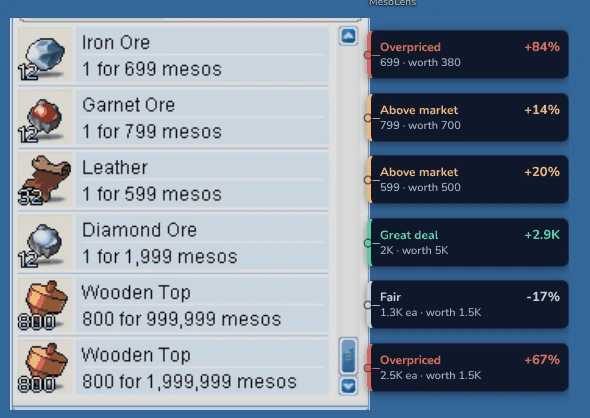 A real shop, read by MesoLens
Your Free Market trip, with the numbers filled in.
Open shops like you always do. MesoLens does the math while you browse, and it keeps learning prices from every player who uses it.
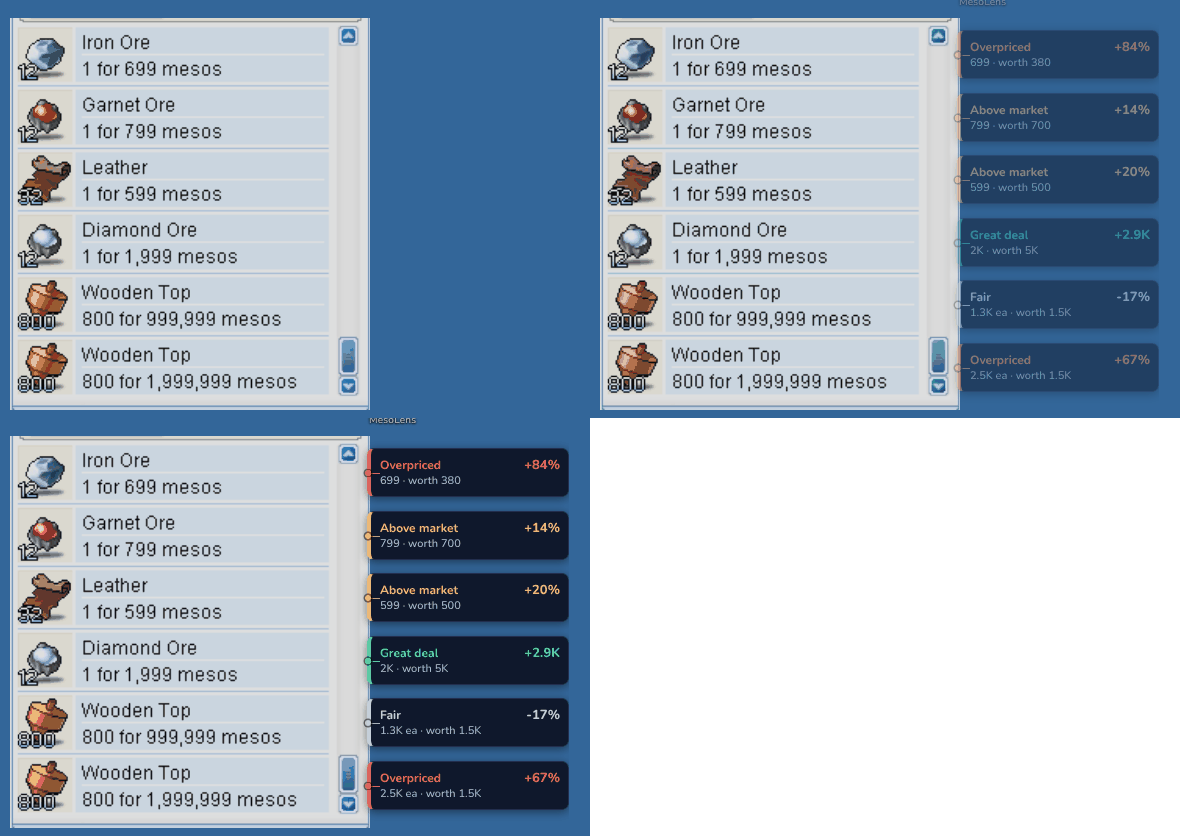
A price badge on every listing
Each item in an open shop gets a badge: what it's worth, and whether the asking price is a great deal, fair, above market or overpriced. Good deals pop up so you don't miss them.
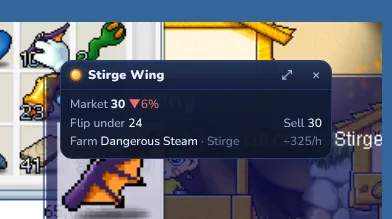
Item cards, right on the tooltip
Rest your pointer on any item: a small card shows its market price and trend, the price to flip under, what it sells for, and the best map to farm it at your level.
- Typical price, sold price and how fast it sells
- Equipment judged by its real stats, not just its name
- Where it drops, and what it crafts into
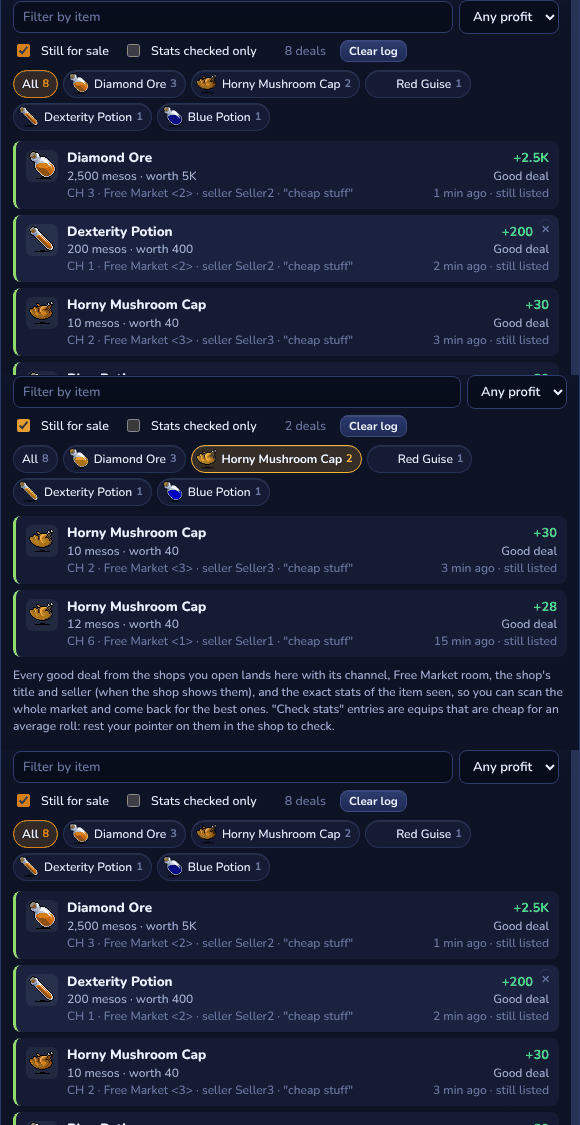
A deals log for the whole market
Every good deal you walk past is saved with its channel, Free Market room, the seller and the shop's title, and whether it's still for sale. Scan the whole market, then go back for the best ones.
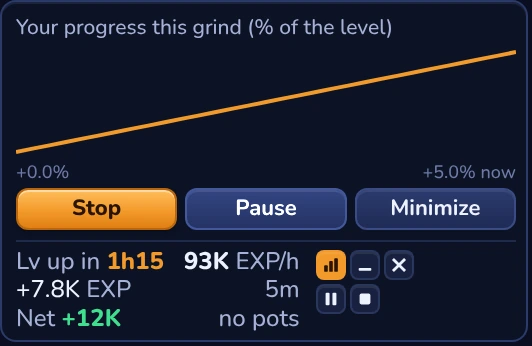
A grind tracker that knows your map
EXP per hour, mesos per hour, and how long until your next level, live while you play. MesoLens also remembers how long each level took you.
- Full grind reports with what you looted and earned (Supporter)
- Weekly rankings, if you want to show off
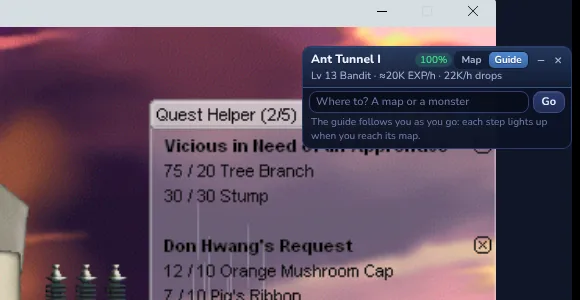
A map guide that points at the portal
Type a map or a monster and MesoLens shows the way: a picture of the map you're on with the portal to take circled, step by step. It also tells you which maps are best for your level and class.
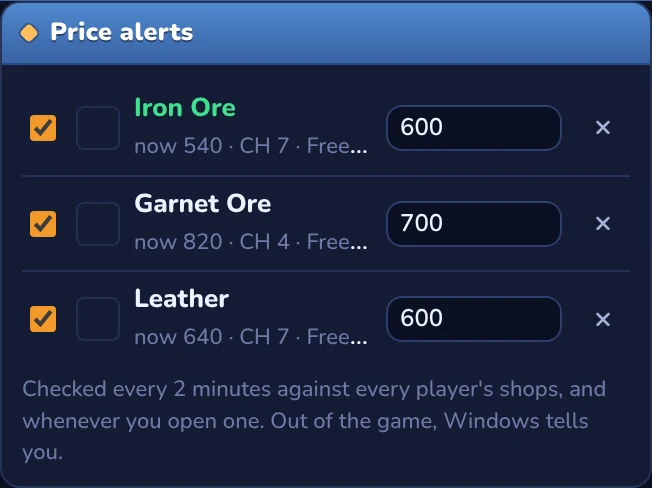
Price alerts, from every player's shops
Star an item and set your price. The moment any MesoLens player sees it listed at or under your price, you're told where: in game as a pop-up, and as a Windows notification when you're away.
It only looks. You do all the playing.
MesoLens works like a screen recorder: it looks at the pixels of the game window and reads them. That's all it ever does with the game.
What MesoLens does
- Reads what's on your screen, like a screenshot
- Shows its badges and cards in its own windows on top
- Shares the shops you open, anonymously, so everyone gets better prices (you can turn it off)
What it never does
- Read or change the game's memory or files
- Inject anything into the game
- Press keys or click for you, or play on its own
- Buy, sell or trade anything for you
MesoLens is a fan-made tool, not approved by NEXON. Like any third-party tool, you use it at your own risk. Never use it, or its data, to bot or to trade game items for real money.
Every shop you open makes the prices better.
MesoLens learns prices from what its players see in the Free Market: listings, what sold and how fast. The more people use it, the sharper everyone's prices get. Free accounts get them twice a day; supporters get them live.
Open 200 Free Market shops in a week and you get Supporter free for the next week. New or changed shops count.
e.g. 144 / 200 this weekFree for everyone. Supporters get the extras.
Everything MesoLens does on your PC is free. A free account adds prices from every player. Supporting keeps the servers running and unlocks the extras.
Free
- The whole overlay: shop badges, item cards, deal pop-ups
- Grind tracker, time per level, map guide
- Crafting, quests, your character and gear
- Prices from every player, refreshed at the game's daily reset and 12 hours later
Supporter
- Everything in Free
- Live prices from every player
- Grind reports
- Latest sales and history
Upgrade in MesoLens: Settings > Account.
Merchant
- Everything in Supporter
- Deals log
- Live shop spots
- Where it's listed now
Upgrade in MesoLens: Settings > Account.
Tycoon
- Everything in Merchant
- Price alerts
- Early access
- Your name in the credits
Upgrade in MesoLens: Settings > Account.
Good to know
Is MesoLens safe to use with MapleStory?
MesoLens only reads your screen, the way a screen recorder or streaming software does. It never reads or changes the game's memory or files, never injects anything and never presses keys or clicks for you. It's a fan-made tool and not approved by NEXON, so like any third-party tool, using it is your call.
What do I get for free?
The whole overlay: price badges in shops, item cards, deal pop-ups, the grind tracker and level times, the map guide, crafting, quests, and your character and gear. Make a free account and you also get prices from every player, refreshed at the game's daily reset (midnight UTC) and 12 hours later.
What does the game need to be set to?
Windowed or Borderless (windowed full screen). Exclusive full screen hides every overlay, MesoLens's included. Then click Watch my screen in MesoLens and pick the MapleStory window.
Windows says "Windows protected your PC". Is that normal?
Yes. MesoLens is new and isn't signed by Microsoft yet, so Windows warns about it the first time. Click More info, then Run anyway. You can check the installer's SHA-256 on the download page.
Does it work on Mac or Linux?
Not yet: MesoLens is for Windows 10 and 11 (64-bit).
What do you do with the shops I share?
They build the shared price database: listings, prices, channel and room, and the seller's shop name as shown in the game. They're market data, not linked to you publicly. You can turn sharing off in the Market tab. See the privacy policy.
How do I cancel or change my tier?
From MesoLens, Settings > Account. You keep your perks until the end of the month you paid for.
How do I uninstall it?
Windows Settings > Apps > MesoLens > Uninstall. It asks whether to keep your saved prices and settings in case you come back.

See the Free Market the way traders do.
Free, about a minute to install, and it never touches the game.